CZ | EN | DE | SK | PL

Adobe Illustrator & CorelDRAW

No more manual retyping. ExportPDF saves your designers hours of tedious work.

Generate hundreds of print-ready PDFs from a single template and CSV spreadsheet. For Illustrator and CorelDRAW. No typos, precise, done in minutes.
✓ In daily use since 2025  ·  6 active users in 2 companies  ·  ✓ Built for our own production  ·  ✓ Works in CZ, EN, DE, SK, PL

How much time will you save?

4+ hours
manually — 200 jerseys
10 minutes
with exportPDF — 200 jerseys

No typos. No errors. Every file exactly as specified.


How much money will you save?

$100
labor cost per 200 jerseys
($25/h rate)
×
20 orders
per month during season
=
$2,000
saved per month

The monthly licence pays off at the 3rd order. The rest of the month is pure profit.

Why business owners love exportPDF

Cut costs, speed up production, and eliminate human error.

  • Pays off in 3 orders. The monthly licence is covered by the third order. The rest of the month is pure profit.
  • No more costly mistakes. Manual retyping leads to typos. ExportPDF places data exactly from CSV — zero losses on materials or reprints.
  • No onboarding downtime. First export ready in 5 minutes. No complex setup.

Why designers will love exportPDF

End of endless grunt work. Leave the routine to the script.

  • Hours become minutes. The script automatically finds the right artboard by product and size (hoodie-XL) and fills it with data instantly.
  • Diacritics sorted out. Font doesn't have hačeks, umlauts or strokes? The script adds them automatically — for CZ, DE, PL and SK.
  • Advanced features. Sponsor logos inside numbers, graphic numbers from symbols, optional graphics for selected players only — all automatic.

Practical export examples from Illustrator and CorelDraw

Video demos

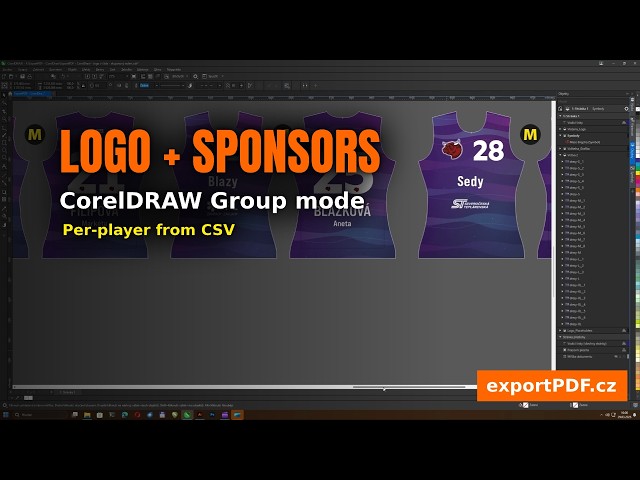
CorelDRAW — Logo in numbers

[CorelDRAW] Logo in numbers — automatic logo insertion directly into digits with dynamic positioning + optional graphics from CSV (group mode)

CorelDRAW — Graphic numbers

[CorelDRAW] Graphic numbers — inserting digits 0–9 as individual graphic symbols with scaling for different sizes (page mode)

Illustrator — Logo in numbers

[Illustrator] Logo in numbers — automatic logo insertion directly into digits with dynamic positioning + optional graphics from CSV

Illustrator — Graphic numbers

[Illustrator] Graphic numbers — inserting digits 0–9 as individual graphic symbols with scaling for different sizes

How It Works

1
1. Prepare a Template

Create a design in Illustrator or CorelDRAW with named text fields

2
2. Upload CSV

Prepare a spreadsheet with data — names, numbers, nicknames, sizes, codes

3
3. Export PDF

The script generates a separate PDF for each row — named and ready to print

What exportPDF Can Do

Features that turn manual work into an automatic process

Batch Export from CSV

Automatic encoding and delimiter detection. Intelligent column-to-field mapping in the template. Hundreds of PDFs in minutes instead of hours.

Graphic Numbers from Symbols

Replace text numbers with graphic symbols from a library. Each digit (0–9) mapped individually with automatic scaling.

Logo Embedded in Numbers

Hybrid system for embedding logos inside graphic numbers with dynamic positioning using reference frames.

International diacritics

Font doesn't support CZ Ř/Š/Ů, DE ß/Ü, PL Ł/Ż or SK Ľ? The script adds them manually. 10 symbol types for 4 languages. Automatic glyph validation.

Multi-line text and indices

First name above surname? Just use || as a separator in the CSV. Chemical formulas H₂O or m²? The script turns H_2O and m^2 into correct typography.

Optional graphics from CSV

Part of the team has a different sponsor? Personalising only some items with a certificate or anniversary mark? Just put the graphic name in the CSV.

Not just jerseys. The script adapts to your production.

Forget rigid templates. In a few seconds, you can reconfigure ExportPDF for exactly what you're producing right now.

Any product combination

Set up the script for any combination of two products at once — hoodies and caps, shirts and shorts, mugs and coasters, or tags and ribbons.

Your own terminology

The script's interface adapts to you. Producing mugs? Dialogs will talk about mugs, not jerseys. No confusing terms from another industry.

Sheet layout for small items Illustrator

Dozens of keychains, stickers or tags on a single print sheet as one PDF instead of hundreds of files. End of hundreds of tiny PDFs at the print shop.

Contours for cutting machines CorelDRAW

Does your cutting machine require a black contour around each pattern piece? Name the objects Laser* and the script generates them automatically. No more dozens of manual edits per template.

Profile management

Jerseys in the morning, business cards in the afternoon? Save configurations as profiles. With one click, load the complete setup for a new order and export right away.

Dynamic scaling

Logos, diacritics and graphic numbers automatically adjust to product size based on a reference field. No manual adjustments for each size S, M, L, XL.

Which application do you use?

About the Author

I have been developing the exportPDF script since 2025. It was born from my own need to automate the creation of personalized printed materials — and I use it daily in my own production.

Aleš Ulrych
info@exportpdf.cz · 776 149 945