CorelDRAW
exportPDF for CorelDRAW
VBA macro (GMS plugin), compatible with CorelDRAW X6 and later.
Remote installation — the plugin is compiled specifically for your CorelDRAW version.
Using Adobe Illustrator? Go to Illustrator version →
CorelDRAW
VBA macro (GMS plugin), compatible with CorelDRAW X6 and later.
Remote installation — the plugin is compiled specifically for your CorelDRAW version.
Using Adobe Illustrator? Go to Illustrator version →
✓ In daily use since 2025 · ✓ 6 users in 2 companies · ✓ Built for our own production · ✓ Interface in CZ, EN, DE, SK, PL
Practical examples of features in CorelDRAW
Graphic numbers — inserting digits 0–9 as individual graphic symbols with scaling for different sizes
Logo in numbers + diacritics — automatic logo insertion into digits and diacritics handling in CorelDRAW
Diacritics + graphic numbers — automatic insertion of diacritics and graphic numbers in CorelDRAW
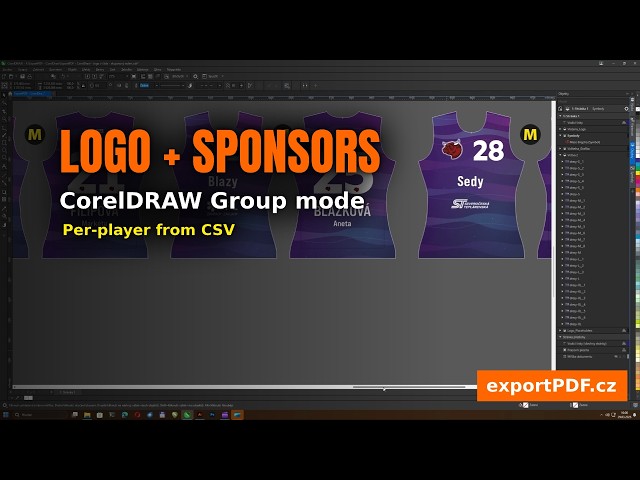
By default, the script works so that each size (S, M, L…) is on a separate page and the output is an individual PDF for each item. Group Mode offers an alternative: all sizes remain on a single page as named groups (e.g. jerseys-S, jerseys-M, jerseys-L). The script automatically calculates the number of items per size from CSV, duplicates the corresponding groups, and fills in the data. You then export using your own method.
Ideal for customers who don't want to change their established workflow
All other features (graphic numbers, logo, diacritics…) work the same
Simply name groups in the product-size format
Group Mode — logo in numbers — automatic duplication and filling of groups based on CSV data
Group Mode — graphic numbers — automatic duplication and filling of groups based on CSV data
Group mode - diacritics + graphic numbers — automatic insertion of diacritics and graphic numbers in CorelDRAW
A feature that saves tens of minutes per order — for manufacturers using cutting machines with optical contour detection.
Modern cutting machines often require a black contour approximately 1.7 mm wide around each pattern piece (front and back panel, sleeves, collar…) that the machine follows when cutting. Creating these contours manually for each piece and each size means dozens of edits per template — for example, 5 sizes × 5 pieces = 25 manual edits.
The script does this work for you. Just name the relevant objects in your template with the word "Laser" (e.g. Laser_sleeve, Laser_front_panel) and the script automatically generates a contour around each of them with a configurable offset.
Instead of 25 manual edits, just name the objects and run the function
Contour offset configurable in millimetres (default 1.5 mm)
Works across all sizes simultaneously — page mode and group mode
Repeated runs — the script removes old contours itself, no duplicates
From bulk export to preparing files for cutting machines — all automatic
Automatic detection of encoding and delimiter. Intelligent column mapping. Hundreds of PDFs in minutes instead of hours of manual work.
Products as separate pages, or as named groups on a single page. Ideal for cutting plotters and print shops with their own workflow.
Automatic generation of cutting contours around objects named Laser*. Offset configurable in mm. No more dozens of manual edits per template for cutting machines.
Replace text numbers with graphic symbols from a library. Each digit 0–9 mapped separately with automatic scaling based on size.
Hybrid system for inserting sponsor logos directly into graphic numbers with dynamic placement via reference frames.
Show a sponsor, certificate or anniversary mark on selected products only? Just put the name in CSV — the script finds and displays the matching graphic.
Font doesn't support CZ Ř/Š/Ů, DE ß/Ü, PL Ł/Ż or SK Ľ? The script adds them manually. 10 symbol types for 4 languages. Automatic glyph validation.
First name above surname? Use || as separator in CSV. Chemical formulas H₂O or m²? The script turns H_2O into correct typography.
Texts rotated by 90°, 180° or −90°? The script reliably places diacritics and logo-in-number correctly even on rotated fields.
Set up the script for any combination — hoodies and caps, mugs and coasters, tags and ribbons. The interface adapts to your terminology.
Jerseys in the morning, business cards in the afternoon? Save configurations as profiles. One click loads the complete setup for a different type of order.
Logos, diacritics and graphic numbers automatically adjust to product size based on a reference field. No manual adjustments for each size.
Every action logged in ExportPDF-Corel_Log.txt. Export issue? Attach the log to an email and we'll solve it quickly.
English, Czech, Slovak, German, Polish. Automatic system language detection. Ideal for international teams.
I develop the script based on real user needs. Write to me — if it makes sense, I'll implement the new feature.
Send a suggestion →The plugin is compiled for your version of CorelDRAW — I install it remotely via AnyDesk (~15 min).
30 runs / 20 CSV rows — free extension key on request.
The CorelDRAW plugin must be compiled specifically for your version of the program — each version uses different internal libraries. Installation and updates are therefore performed remotely via AnyDesk (typically 10–15 minutes). I install the demo version free of charge — it has the same limits as the Illustrator version and includes all features. After reaching the limit, you can request a key to extend the demo (free of charge, by agreement) or upgrade to the full version. Contact me at info@exportpdf.cz with your CorelDRAW version, and we'll arrange an installation time.
| Demo | Full Version | |
|---|---|---|
| All features | ✓ | ✓ |
| Number of runs | 30 | ∞ |
| CSV rows | 20 | ∞ |
| Personal support | ✗ | ✓ |
I have been developing the exportPDF script since 2025. It was born from my own need to automate the creation of personalized printed materials — and I use it daily in my own production.
Aleš Ulrych
info@exportpdf.cz · 776 149 945